Now available for single-site teams

Schedule shifts, notify workers, avoid no-shows.

ScheduleSpark gives owners a clean weekly calendar, sends workers their own shift updates, and keeps the team aligned without spreadsheets or group-chat confusion.

Free for single-site teams. No credit card required.

Built for shift-based teams across industries

🍽️Restaurants
🛍️Retail
🏥Healthcare
🏨Hospitality
🚚Logistics
🏗️Construction

How It Works

From blank week to confirmed schedule

01

Create your site

Set your site name, timezone, and team basics so every schedule uses the right local working week.

02

Add workers and roles

Create workers, roles, tags, and repeatable shift patterns before assigning the week.

03

Publish updates

Notify workers, collect acknowledgements, and handle swaps or time-off requests as plans change.

Features

The scheduling workflows your team actually needs

ScheduleSpark is built around the weekly rhythm of shift-based teams: plan, notify, confirm, adjust, and export.

Weekly schedule calendar

Owner workspace

Build the week visually, assign workers, and spot coverage gaps before the schedule goes out.

Worker notifications

No app install

Send shift details through email, with WhatsApp-ready workflows for teams that live on mobile.

Worker self-service

Mobile ready

Workers see upcoming shifts, acknowledge updates, request swaps, and manage availability from a focused portal.

Recurring shift templates

Time saver

Save the weekly patterns you repeat and adjust future shifts without rebuilding the whole rota.

Shift swaps and time off

Controlled

Give workers a clear request path while owners keep final approval and schedule control.

Hours and exports

Operations

Review weekly hours, prepare CSV/PDF exports, and keep payroll prep from turning into spreadsheet cleanup.
Product Tour

One workspace for owners. One simple view for workers.

ScheduleSpark keeps the operational controls with managers while giving workers a clear path to see and respond to their own shifts.

Owner calendarScheduleSpark

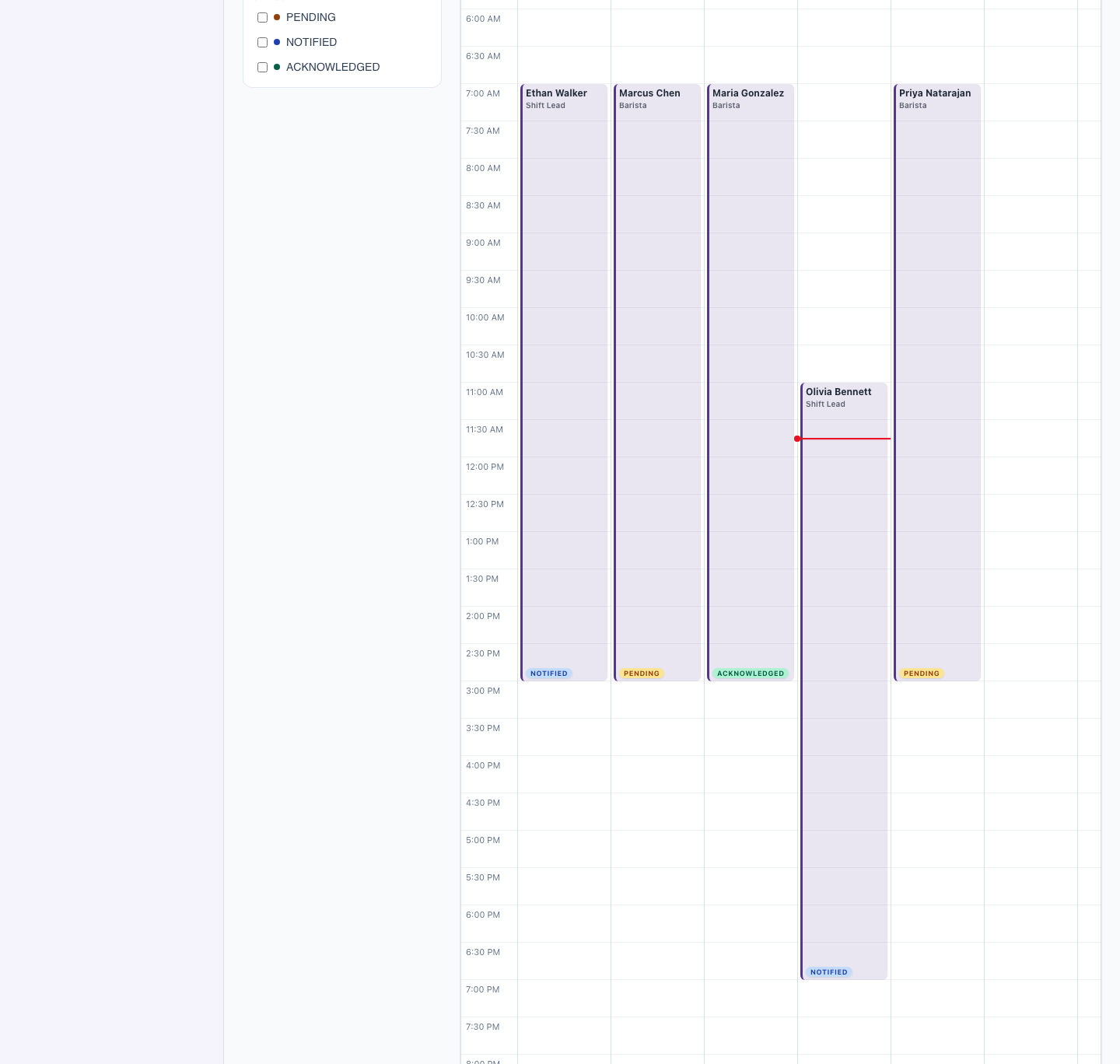
Plan the week with every worker in view

Create shifts, assign roles, filter the schedule, and keep site-level changes in one calendar built for repeated daily use.

Weekly grid
Roles and tags
Recurring templates
Worker availability checks
ScheduleSpark weekly schedule calendar showing worker shifts across the week with pending, notified, and acknowledged status badges
Worker portalScheduleSpark

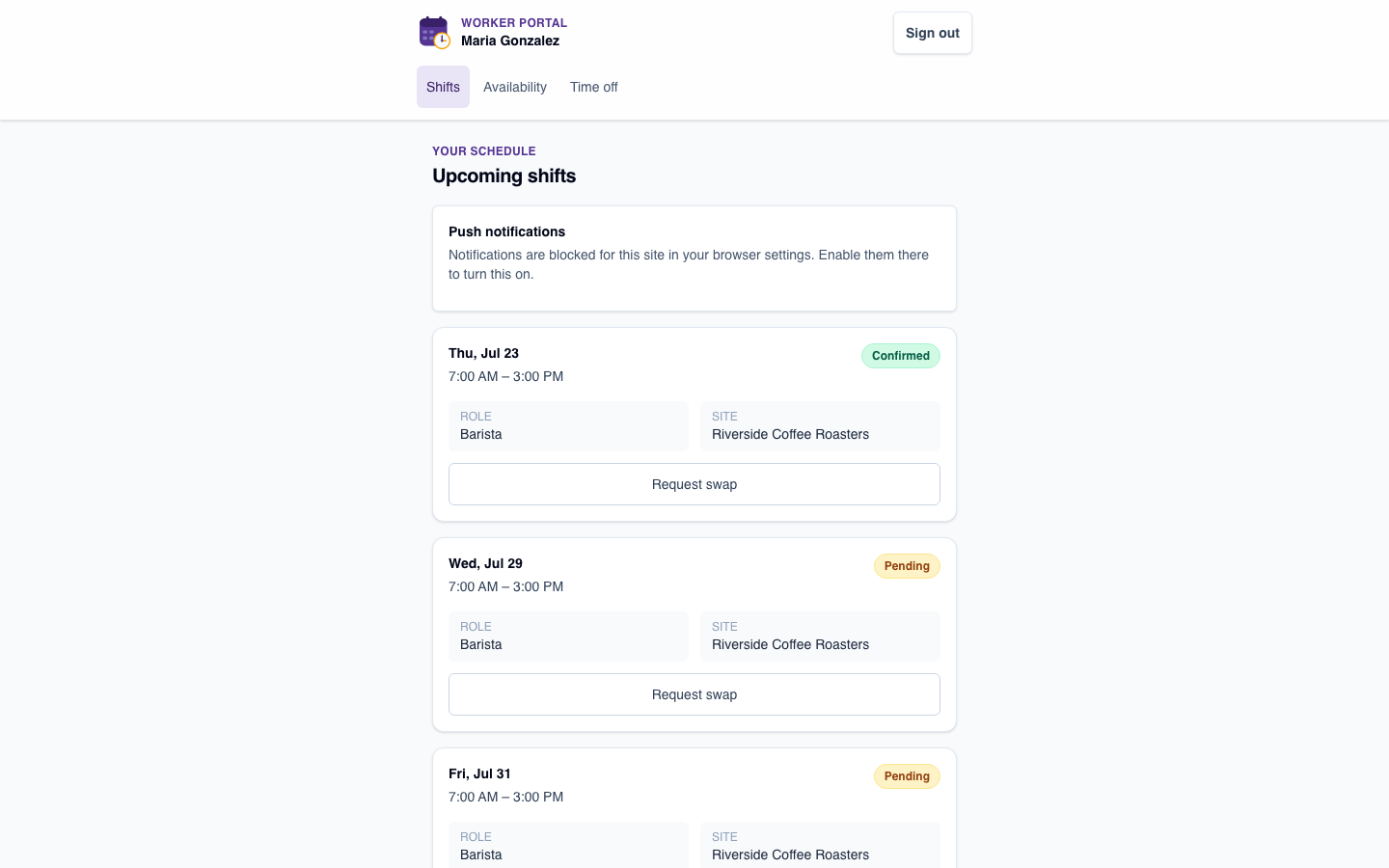
Give workers only what they need

Workers get a mobile-friendly place to view their upcoming shifts, acknowledge updates, and request changes without seeing owner-only scheduling tools.

Upcoming shifts
Acknowledgements
Swap requests
Time-off requests
ScheduleSpark worker portal showing a worker's upcoming shifts with confirmed and pending status

Use Cases

Built for teams that run on shifts

The workflows are flexible enough for different industries, but focused enough to stay fast for everyday scheduling.

Restaurants and cafes

Cover lunch rushes, late closes, part-time availability, and last-minute swaps without chasing staff across chats.

Retail stores

Build predictable weekly rotas, keep associates notified, and see staffing gaps before the shop floor feels them.

Clinics and care teams

Coordinate reception, support, and care shifts with clear worker views and owner-controlled approvals.

Field and service teams

Plan distributed crews, keep everyone aligned on assignment times, and prepare clean exports for operations.

Before & After

What changes with ScheduleSpark

Before ScheduleSpark

  • Schedules managed in spreadsheets or shared docs
  • Shift changes buried in group chat messages
  • Workers scroll through everyone's hours to find their own
  • Managers repeatedly answer the same schedule questions
  • Last-minute changes are easy to miss

With ScheduleSpark

  • One weekly calendar for the whole team
  • Each worker only sees their own upcoming shifts
  • Availability is visible right on the scheduling screen
  • Shift changes are emailed to the worker automatically
  • Workers acknowledge shifts with one tap, so managers know it was seen

Pricing

Start free. Scale when your operation needs more.

Small teams can schedule immediately. Larger or multi-location teams can talk to us about the rollout they need.

Free

Single-site teams

$0

No credit card

  • Single-site scheduling
  • Unlimited workers and shifts
  • Calendar, roles, tags, and templates
  • Worker portal and acknowledgements
  • Email notifications
Start free

Enterprise

Multi-location teams

For teams that need multi-site controls, custom branding, rollout support, or dedicated operational requirements.

  • Multiple sites and custom domains
  • Advanced roles and operational controls
  • Branding and support workflows
  • Payroll and reporting conversations
  • Deployment and onboarding support
Talk to us

FAQ

Frequently asked questions

Is ScheduleSpark really free?

Yes. The core scheduling features — worker management, shift creation, the calendar view, and email notifications — are free forever for a single site. No credit card is required to get started.

How are workers notified about shifts?

When you assign or update a shift, ScheduleSpark emails the worker the shift details right away. Workers can store a WhatsApp number on their profile too, and WhatsApp delivery is on our roadmap.

Do workers need to create an account or download an app?

No. Workers get a simple, mobile-friendly link to view their upcoming shifts and acknowledge them with one tap. There's nothing to install.

How many workers or shifts can I schedule for free?

The free tier supports a single site with unlimited workers and shifts. Multi-site accounts are available today for teams that need to manage more than one location.

What businesses is ScheduleSpark built for?

Any business that schedules shift-based or rotating workers — restaurants, retail stores, healthcare teams, hospitality, logistics, and construction crews all use ScheduleSpark to build and share weekly schedules.

How is ScheduleSpark different from a shared spreadsheet or group chat?

ScheduleSpark gives you a single Teams-style calendar to build the whole week at a glance, then automatically notifies each worker only about their own shifts — instead of everyone scrolling through one spreadsheet or chat thread to find their hours.

How long does it take to set up?

Most site owners are set up in under a minute: create your site, add your workers by name and email or WhatsApp number, and start assigning shifts.

See it in action

Request a live demo

We'll walk you through ScheduleSpark and answer questions specific to your team.

Enterprise

Scheduling across every site, managed centrally.

Running scheduling for multiple locations or a larger team? Our Enterprise plan adds the controls, security, and support your organization needs.

  • Multiple sites & locations under one account
  • Manager roles with delegated scheduling access
  • Custom branding for your team-facing pages
  • SSO / SAML login for your organization
  • Payroll integrations (Xero, QuickBooks)
  • Dedicated support with a guaranteed SLA

Talk to our team

Tell us about your organization and we'll reach out to set up a walkthrough.

Start with this week's schedule. Keep the team aligned.

Create your site, add workers, and send the first schedule without a credit card.

No credit card. No commitment. Just cleaner scheduling.

Contact Us

Questions? We're happy to help.

Send us a message, or email us directly at hello@schedulespark.com.